
Last updated on
Nov 12, 2026

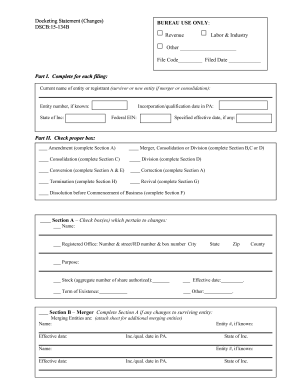
Docketing Statement DSCB 15-134A 2012 free printable template
pdfFiller is not affiliated with any government organization

Fill out
Complete the form online in a simple drag-and-drop editor.

eSign
Add your legally binding signature or send the form for signing.

Share
Share the form via a link, letting anyone fill it out from any device.

Export
Download, print, email, or move the form to your cloud storage.
Why pdfFiller is the best tool for your documents and forms


End-to-end document management
From editing and signing to collaboration and tracking, pdfFiller has everything you need to get your documents done quickly and efficiently.
Accessible from anywhere
pdfFiller is fully cloud-based. This means you can edit, sign, and share documents from anywhere using your computer, smartphone, or tablet.
Secure and compliant
pdfFiller lets you securely manage documents following global laws like ESIGN, CCPA, and GDPR. It's also HIPAA and SOC 2 compliant.
What is Docketing Statement DSCB 15-134A
The Pennsylvania Docketing Statement is a government form used by businesses to register with the Pennsylvania Department of State and Revenue for initial tax reporting and business licensing purposes.
pdfFiller scores top ratings on review platforms




Who needs Docketing Statement DSCB 15-134A?
Explore how professionals across industries use pdfFiller.

Docketing Statement DSCB 15-134A is needed by:
-
Business owners seeking to register in Pennsylvania
-
Entrepreneurs starting a new business in PA
-
Existing entities updating their registration
-
Legal representatives filing on behalf of a business
-
Tax professionals assisting with business filings
Comprehensive Guide to Docketing Statement DSCB 15-134A
What is the Pennsylvania Docketing Statement?
The Pennsylvania Docketing Statement serves as a crucial form in the business registration process within the state of Pennsylvania. This document plays a key role in ensuring that businesses comply with various legal requirements while also facilitating initial tax reporting and licensing.
When filling out the Pennsylvania Docketing Statement, businesses must provide specific information, including the entity name and the nature of their business activities. Such details are essential for proper identification and categorization within the state’s regulatory systems.
Purpose and Benefits of the Pennsylvania Docketing Statement
Completing the Pennsylvania Docketing Statement accurately and promptly offers numerous advantages for business entities. It primarily aids in maintaining compliance with Pennsylvania’s regulations, thus preventing potential legal issues that could arise from improper registration.
Furthermore, submitting this form can ensure eligibility for various state business benefits, fostering a smooth operation for new and existing enterprises. Timeliness in submission directly correlates with the avoidance of delays and complications during the business establishment process.
Who Needs the Pennsylvania Docketing Statement?
The Pennsylvania Docketing Statement is mandatory for specific types of business entities, including Limited Liability Companies (LLCs) and corporations. Newly established businesses along with existing entities that are initiating new activities are typically required to file this statement.
It is important to note that there may be exceptions or special cases where certain entities are exempt from this requirement, though these distinctions usually depend on the business's structure and operations.
How to Fill Out the Pennsylvania Docketing Statement Online (Step-by-Step)
Filling out the Pennsylvania Docketing Statement online through pdfFiller is a straightforward process. Follow these steps to complete the form:
-
Access the form on pdfFiller and identify the section for the Dept. of State Entity #.
-
Enter the required details in each blank field, ensuring accuracy in entity names and business activity.
-
Utilize the available checkboxes appropriately for business type classification.
-
Review the completed form for any errors or missing information.
-
Save and submit your form as per the selected submission method.
pdfFiller offers user-friendly tools to assist with filling out forms effectively, making the entire process easier.
Common Errors and How to Avoid Them
When filling out the Pennsylvania Docketing Statement, there are common mistakes that applicants should be aware of. Frequent errors include submitting incorrect entity names or leaving fields incomplete, both of which can lead to processing delays.
To avoid these issues, it is advisable to double-check all provided information before submission. Utilizing available resources to validate your entries can significantly reduce the chances of making errors.
Submission Methods and Delivery for the Pennsylvania Docketing Statement
Submitting the Pennsylvania Docketing Statement can be accomplished through various methods, each having its own advantages and disadvantages:
-
Online submission is typically the fastest option, allowing for immediate processing.
-
Mailing the form requires careful attention to deadlines, as postal delays can occur.
-
In-person submissions offer direct interaction, which can be beneficial for clarification and immediate feedback.
Each submission method may have specific documentation or fees associated with it. Additionally, applicants should be aware of submission deadlines and expected processing times to ensure timely registration.
What Happens After You Submit the Pennsylvania Docketing Statement?
After submitting the Pennsylvania Docketing Statement, applicants can track the status of their application through the appropriate channels. A confirmation of submission typically follows, alongside notifications regarding the approval or rejection of the application.
Depending on the outcome, applicants may need to take additional steps in the business registration process, ensuring all legal prerequisites are adequately addressed.
Security and Compliance for the Pennsylvania Docketing Statement
Security is a vital aspect when handling sensitive information in the Pennsylvania Docketing Statement. pdfFiller implements robust security protocols, such as 256-bit encryption and compliance with HIPAA and GDPR regulations, to protect user data.
Ensuring the safety of sensitive business information during the filling process is paramount, and pdfFiller provides assurances that user data remains private and secure throughout the entire procedure.
Use pdfFiller to Simplify Your Pennsylvania Docketing Statement Experience
Leveraging pdfFiller for completing the Pennsylvania Docketing Statement can significantly enhance the user experience. The platform offers efficient document management features that make filling out forms easier than ever.
Key functionalities, such as editing tools and electronic signing capabilities, help streamline the process while ensuring full compliance with state requirements. Utilizing these features allows users to safeguard their business interests efficiently.
How to fill out the Docketing Statement DSCB 15-134A
-
1.To access the Pennsylvania Docketing Statement on pdfFiller, visit their website and search for 'Pennsylvania Docketing Statement' in the form search bar.
-
2.Open the form by clicking on the appropriate link. Ensure you have all necessary materials ready, such as your business name, entity type, and contact information.
-
3.Begin filling out the form by entering the entity name in the designated field. Make sure to match it exactly as it appears in your registration documentation.
-
4.Next, locate the field for the 'Dept. of State Entity #' and input the number if applicable.
-
5.Continue by providing information about the responsible individual. Fill in their contact information and indicate their role within the company.
-
6.Review the section regarding business activity. Use the drop-down menu or checkboxes to select the appropriate business type.
-
7.Before finalizing, go through the entire form to make sure all blank fields are filled and checkboxes selected as necessary.
-
8.Once you have confirmed the information is accurate, save your work regularly to ensure you don’t lose any data.
-
9.After completing the form, click on the ‘Review’ button in pdfFiller to check for any errors or missing information.
-
10.When you are satisfied with the form, download it as a PDF, or use the submit feature to send it directly if available.

Who is eligible to submit the Pennsylvania Docketing Statement?
Any business entity operating or intending to operate in Pennsylvania can submit the Pennsylvania Docketing Statement for registration with the Department of State.
Are there any deadlines for submitting the form?
It is recommended to submit the Pennsylvania Docketing Statement as early as possible during your business registration processes. Check for specific deadlines associated with entity types.
How can I submit the completed form?
You can submit the completed Pennsylvania Docketing Statement electronically through pdfFiller, after filling out and downloading the form, or by mailing it to the appropriate state office.
What supporting documents are required with this form?
Typically, supporting documents may include a business formation certificate and any applicable identification of the responsible individual whose information you provide within the form.
What are common mistakes to avoid when filling out the form?
Ensure all fields are accurately completed without missing any blank fields. Pay attention to the entity name and double-check the selected business type.
How long does processing take after submitting the form?
Processing times can vary; generally, expect a few weeks to receive confirmation of your registration, though it may be expedited for additional fees.
What should I do if I encounter issues while filling out the form?
If you experience difficulties, consult the help section of pdfFiller or contact the Pennsylvania Department of State for assistance. They can provide detailed guidance.
Docketing Statement DSCB 15-134A Form Versions
Related Content
Related Forms




Related Catalogs
Get the latest insights from our blog


If you believe that this page should be taken down, please follow our DMCA take down process
here
.
This form may include fields for payment information. Data entered in these fields is not covered by PCI DSS compliance.